

Meetings are where audio problems get expensive – missed details, repeated questions, and that constant “sorry, can you say that again?” If Krisp isn’t the right fit, there are plenty of Krisp alternatives designed specifically for Zoom, Microsoft Teams, Google Meet, and dialer-based calls. The tricky part is that not all noise suppression behaves the same in meetings: some tools crush background chatter but distort voices, while others handle keyboard clacks yet struggle with echo. Compatibility also matters – what works flawlessly on a Mac might be finicky on Windows, or vice versa.
This article focuses on the top options for day-to-day calls, with an emphasis on stability, voice clarity, and how easily they slot into your meeting workflow.
TL;DR – Best Krisp Alternatives
- FuseBase: Best for client-facing teams that need bot-free recording, client-ready recaps, internal risk notes, and a branded portal.
- Tactiq: Real-time transcription that turns into tasks and emails for teams working in Meet/Teams/Zoom.
- Jamie: Multilingual, privacy-first, bot-free capture for online and in-person meetings.
- Utterly: On-device noise cancellation for Mac users who prioritize privacy and clean audio for calls, live streams, and webinars.
- Read.ai: Live coaching, sentiment, and engagement insights across meetings and comms.
- Supernormal: Bot-free summaries with templates and task/CRM sync for fast follow-through.
- Otter: Collaborative live transcription and captions for inclusive, hybrid teams.
What is Krisp?
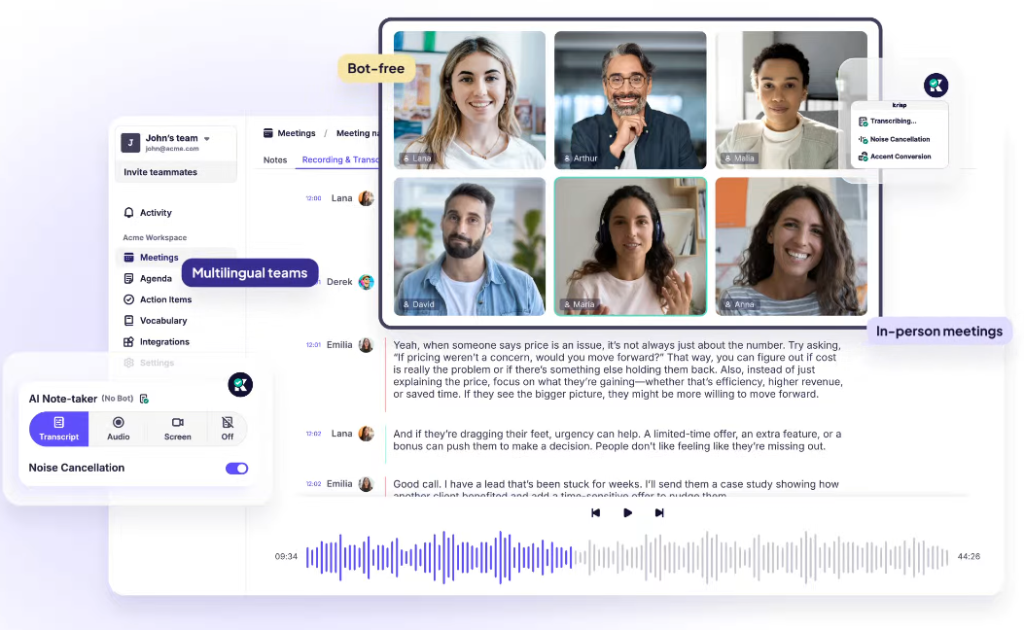
Krisp began as an on-device audio enhancer and has evolved into an AI meeting assistant focused on noise cancellation and clarity. It uses AI to filter background noise and unwanted voices at the system microphone level, adds accent smoothing to make speakers easier to understand, and plugs into the tools teams already use – Zoom, Microsoft Teams, and Google Meet. On top of its audio strengths, Krisp now offers automatic transcription, meeting notes, and summaries, plus an assistant that can draft follow-up emails and messages. Local processing is a core appeal for users who want performance and privacy without bringing a bot into their calls.
Most Krisp competitors now ship decent transcription and summaries, making audio hygiene closer to table stakes. Krisp remains a strong choice if your priority is consistently clean, intelligible calls in less-than-ideal environments and you want a low-friction add-on that fits your existing stack. If you need more than clean calls – client-ready recaps, internal risk flags, or automated task handoff – you may compare Krisp against alternatives that push deeper into meeting outcomes rather than audio alone.
How to Choose a Krisp Alternative in 2026
Krisp sits at the intersection of real-time audio cleanup (noise/echo/voice removal) and meeting productivity (transcripts, notes, summaries). The best “alternative” depends on which side you actually need.
Start with your real goal: cleaner audio, smarter meetings, or both?
If you mainly want clearer calls, prioritize tools that remove background noise, room echo, and (ideally) nearby voices in real time.
If you mainly want meeting outcomes, prioritize accurate transcription + notes + action items (and integrations with your workflow).
Make sure it works where you actually call
Ask: “Where do I take calls 90% of the time?”
- In Teams/Zoom/Google Meet: built-in noise suppression can be “good enough” and requires zero extra setup (Teams is a common example).
- Across every app (system-wide): look for a “virtual mic/speaker” style solution that works in any calling app, not just inside one platform.
Bot-free experience (no “note-taker bot” joining your call)
If “bot-free” is a must, you want a tool that records and transcribes from your side – typically via a desktop app or browser extension – so it doesn’t join the meeting as an extra participant. This avoids “unknown attendee” friction, reduces the chance of IT/security blocks, and keeps your attendee list clean. In practice, bot-free tools usually rely on local capture (your mic + system audio) or in-browser caption capture, rather than being invited into the call.
Privacy is a feature in 2026 – treat it like one
For sensitive calls, confirm:
- Is processing on-device or cloud? Krisp emphasizes on-device approaches for privacy/performance (including on-device transcription in some scenarios).
- Does audio leave the device for noise cancellation? Krisp’s privacy policy states that for noise cancellation only, audiovisual data doesn’t leave the device. Use that as the benchmark when comparing alternatives.
- Data retention + admin controls: for teams, look for clear retention policies, audit logs, and enterprise controls.
Top 6 Krisp Alternatives in 2026
1. FuseBase (best for client-facing teams)
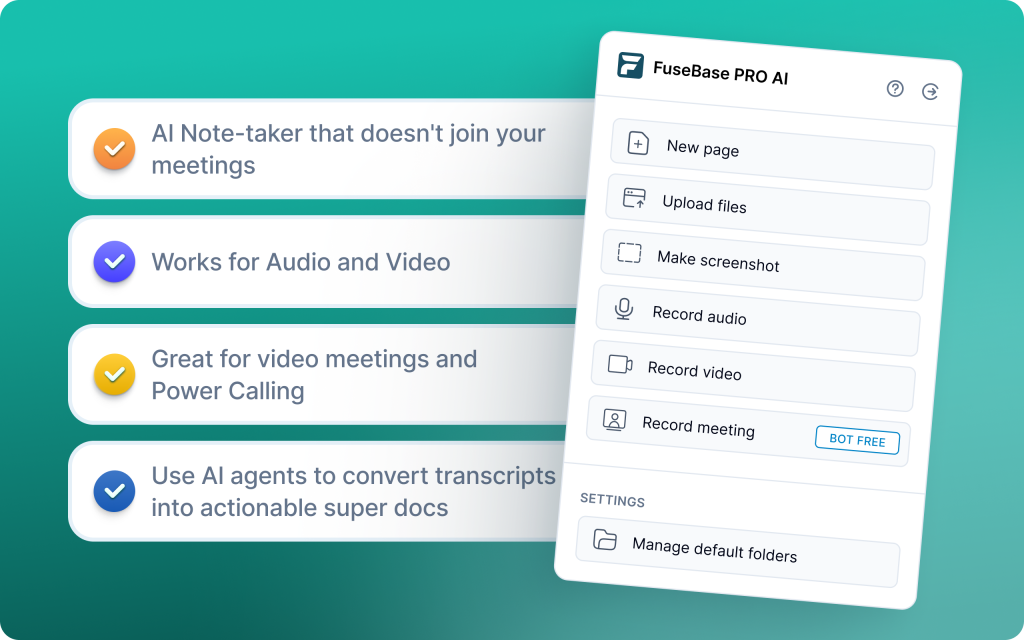
FuseBase matches Krisp’s privacy-first stance with a bot-free browser extension that records Zoom, Teams, and Meet without adding a “Silent Guest.” Every call becomes a shareable mini-room with recap, files, and next steps, not just a smarter transcript link. Beyond summaries, FuseBase turns meeting data into a branded Client Portal or an internal workspace so follow-through actually happens. Its AI Agents watch calls for risks, opportunities, and follow-ups, then create real tasks, owners, and deadlines in your existing tools. Smart partition automatically separates internal coaching notes and scope creep signals from the safe-to-share client recap. It’s built for professional services, agencies, and CS teams managing high-value partners who need client-ready outputs and internal control in one place.
Pros
- Bot-free option records via browser extension, so you don’t get the “Silent Guest” issue
- AI Agents create follow-ups, notes, can detect scope creep, and create automated tasks in a project management tool
- The smart partition feature can automatically separate internal risks from external client recaps
- Raw recordings are turned into a professional “Deal Room” that has files, next steps, and widgets
Cons
- It can be overkill for personal use, and users who need simple notes
- Not primarily a noise-cancelling tool
2. Tactiq (best for real-time transcription & tasks)
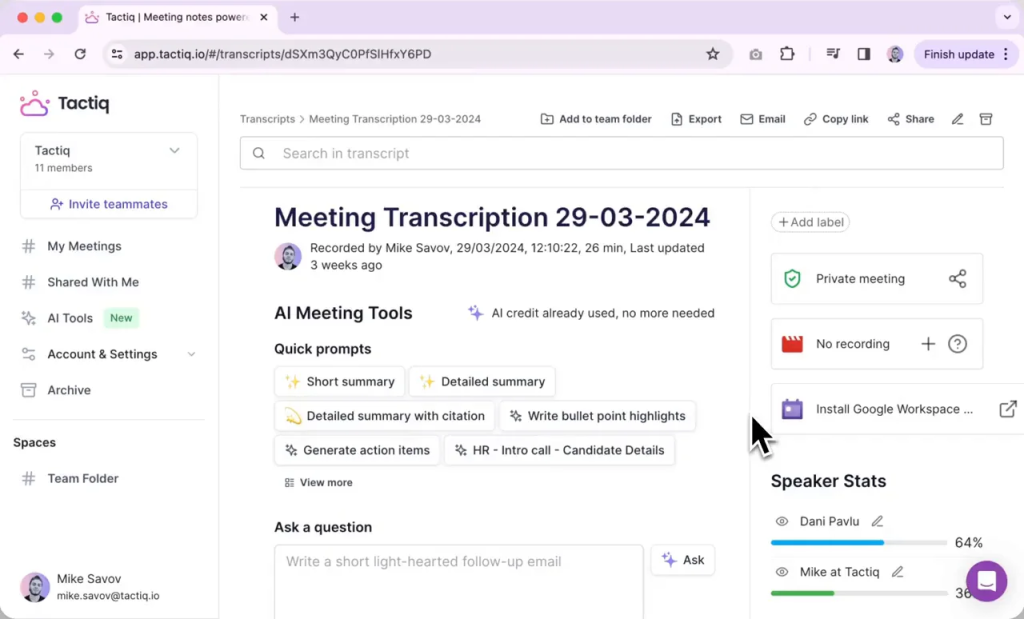
Tactiq is best for real-time transcription that turns into action, not just cleaner audio. It works across Google Meet, Microsoft Teams, and Zoom via a Chrome extension to capture accurate transcripts with speaker IDs, timestamps, and highlights. It generates summaries, agendas, and actionable tasks that sync to your tools. You can ask the AI questions about what was discussed, enable live captions in Meet, and upload past audio or transcripts for retroactive summaries. Multilingual teams benefit from translations in 60+ languages, a localized UI in 7 languages, regional dialect support, and automatic filler-word removal for cleaner notes. It also detects sentiment to help sales reps read the room and can assign tasks directly from discussions to streamline handoffs.
Pros
- Real-time transcription with speaker identification, timestamps, and highlights
- Strong AI summaries, agenda creation, and Q&A on meeting content
- Task assignment and professional email drafting from discussions
- Live captions for Google Meet and automatic filler-word removal
Cons
- Struggles with unclear audio and certain accents; may transcribe inaccurate words
- No sales coaching and limited cross-meeting intelligence
- No concurrent meetings, limiting busy managers who juggle multiple calls
3. Jamie (best for multilingual, bot-free notes)
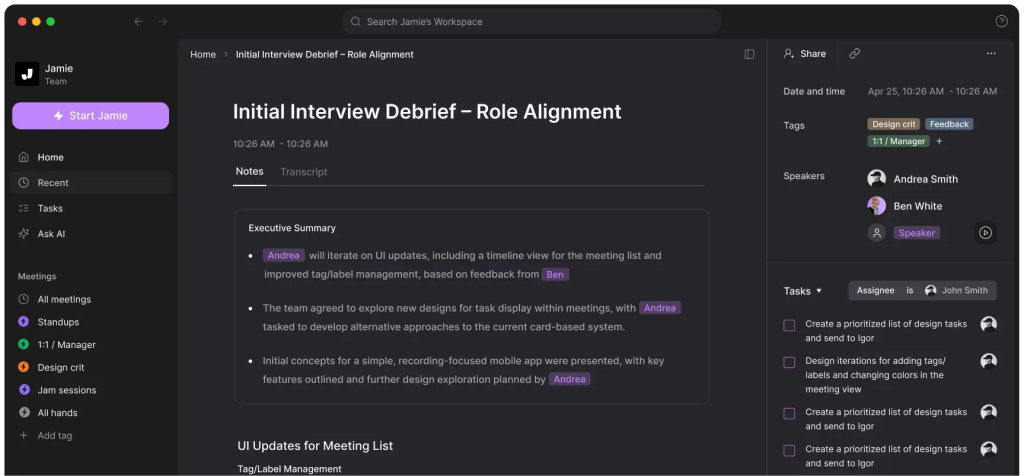
Jamie is a privacy-first, bot-free assistant that runs on your device to capture and summarize meetings in multiple languages across Zoom, Teams, Meet, and in-person sessions. It prioritizes fast, accurate transcription and concise summaries, minimizing friction during live calls and working even offline. GDPR-focused and hosted in Europe, Jamie suits distributed teams that need unobtrusive capture and clear action items without a visible meeting bot. It delivers customizable summaries and clean handoffs, but offers lighter native CRM and ticketing integrations. If you value multilingual coverage, privacy, and simplicity over heavy enterprise workflows, Jamie is a strong pick.
Pros
- Bot-free, on-device capture with offline support and low meeting friction
- Fast, accurate multilingual transcription and customizable summaries
- GDPR-first posture with secure European hosting
- Works across online and in-person meetings for flexible capture
Cons
- Lighter native CRM/ticketing integrations and limited analytics
- No deal room or client portal – summaries are shared manually
4. Utterly (best for Mac users needing lightweight privacy)
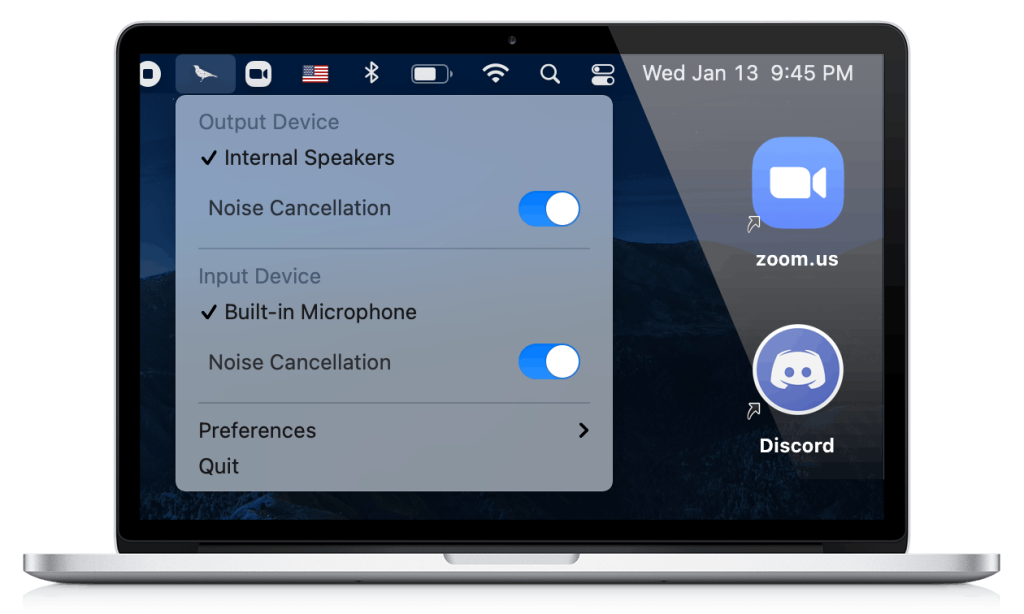
Utterly is a real-time, on-device noise-cancelling plugin for Mac that keeps all audio processing local, so nothing leaves your computer. It filters background noise and constant static like fans or AC across Zoom, Teams, Meet, Discord, and more, and it’s designed to be battery efficient for long calls, live streams, or webinars. Compared to Krisp’s newer assistant features, Utterly stays focused on audio hygiene rather than transcription or notes. If your primary need is clean, private audio with minimal overhead, Utterly is a simple, effective choice for Mac users.
Pros
- 100% on-device AI processing – no audio leaves your computer
- Works with major conferencing apps (Zoom, Teams, Meet, Discord, etc.)
- Excellent at removing constant static noise (fans, AC, hum)
- Battery efficient for long sessions and live streams
Cons
- Mac-only (no Windows support)
- Audio-only focus – no transcription, summaries, or assistant features
- Limited roadmap depth beyond core noise cancellation
5. Read.ai (best for live coaching & insights)
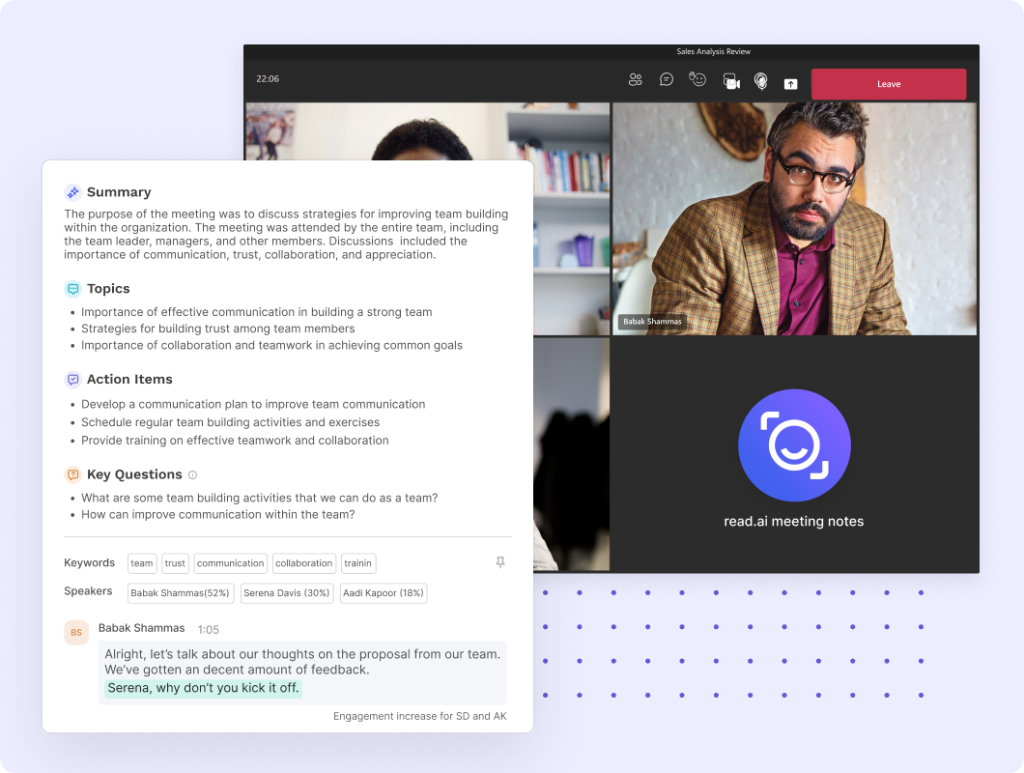
Read.ai targets teams that want meeting insights and conversation tracking. It records Zoom, Teams, and Google Meet, provides real-time summaries, and measures engagement and sentiment while the meeting is in progress. The Speaker Coach evaluates talk time and style to improve delivery, and Transcription 2.0 adds audience reactions and clearer AI summaries. Search Copilot scans across meeting transcripts, Slack, Teams, Gmail, and Outlook so leaders can find answers and decisions faster. If you need automatic notes, coaching, and cross-platform knowledge retrieval, Read.ai is a strong alternative to Krisp.
Pros
- Rich analytics with sentiment, engagement metrics, and Speaker Coach for actionable coaching
- Real-time summaries and scores displayed inside Zoom and Teams, not just post-call
- Search Copilot to query transcripts, emails, and chats for cross-platform answers
- Quick setup and accurate translation performance, especially Spanish-English
Cons
- The meeting bot can persist or rejoin even after deactivation or removal
- Free plan is too limited for proper team evaluation
- Auto-attaches to calendars and meetings, and can be hard to fully remove
6. Supernormal (best for bot-free summaries & task sync)
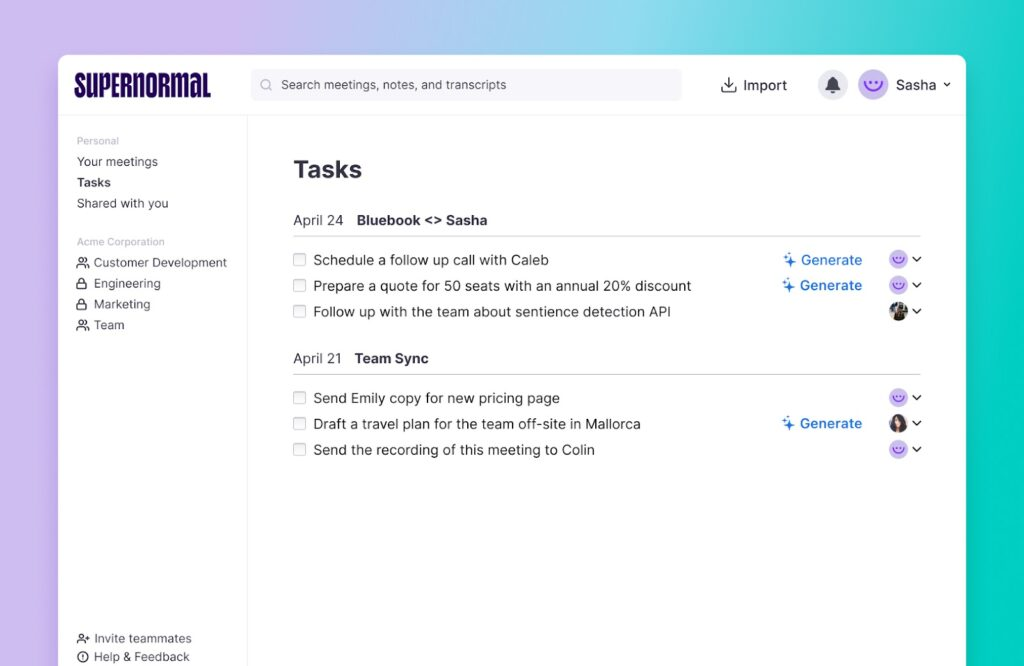
Supernormal focuses on fast, high‑quality notes without a visible meeting bot, capturing, transcribing, and summarizing calls across Zoom, Google Meet, and Microsoft Teams. It centralizes recordings and notes so teams can review, share, and act on key points from one place. Templates match common meeting types (1:1s, client calls, interviews, team syncs) to keep outputs consistent, and “Ask Norma” lets you query past meetings or generate follow‑ups. Action items can sync to tools like Asana, ClickUp, Linear, Trello, and CRMs like HubSpot, turning takeaways into real work. If you want clean summaries and task handoff without bot overhead, Supernormal is a practical, lightweight alternative to Krisp’s audio‑first value.
Pros
- Bot‑free capture via extensions or integrations; works across Zoom, Meet, and Teams
- Templates by meeting type for consistent, high‑quality notes
- Task and CRM sync (Asana, ClickUp, Linear, Trello, HubSpot) to drive follow‑through
- “Ask Norma” to query past meetings and generate follow‑up content
Cons
- Weaker advanced search and occasional difficulty quoting exact phrases
- Language support is inconsistent across platforms and settings
7. Otter
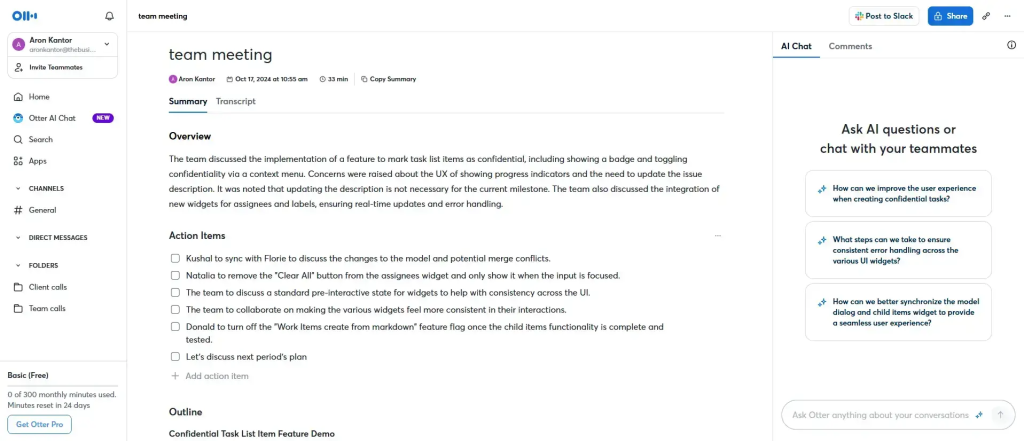
Otter remains a leading transcription‑first assistant and a practical Krisp alternative when your priority is real‑time captions, searchable notes, and team collaboration. It supports meetings and interviews, enables multiple users on one account, and provides live captions during calls for accessibility. Teams can co‑annotate in real time with comments, highlights, and task assignments, while keyword search and automated summaries make follow‑up faster. Otter integrates with major meeting platforms and offers a mobile app so transcripts are accessible on the go. If you want inclusive, shared understanding during meetings rather than post‑call cleanup, Otter fits well for hybrid teams.
Pros
- Real‑time transcription and live captions for accessible, inclusive meetings
- Strong team collaboration with shared notes, comments, highlights, and task assignments
- Keyword and phrase search plus automated summaries for fast recall
- Multi‑user support and mobile app for on‑the‑go access
Cons
- Diarization can struggle in large meetings, confusing who is speaking
- English‑only support limits multilingual use cases
- Video recordings not included in most plans
Summary
Krisp excels at audio hygiene – noise cancellation, voice isolation, accent smoothing – and adds basic transcription and notes. But most 2026 workflows need more than clean calls. They need clean outcomes: client-ready recaps, internal risk flags, and automated follow-ups that show up where work happens.
FuseBase stands out when meeting outputs must live in a structured workspace rather than a transcript link. It turns each call into a reusable room with recap, files, next steps, and internal vs external partitions. For client-facing teams, that means fewer missed handoffs, clearer alignment, and faster time to first action.
The best approach is to map your requirements first – how you share recaps, how you track action items, and where follow-ups should land – then run a real-meeting trial with 2 to 3 tools. Measure impact on follow-up speed, missed commitments, and account risk. Pick the one that moves revenue and retention, not just audio quality.